![Sojo_logo_primary.png]](https://help.getsojo.com/hs-fs/hubfs/Sojo_logo_primary.png?width=80&height=40&name=Sojo_logo_primary.png)
sojo has a direct integration to iTrip for all franchisee locations. Here's how to get connected:
Integration instructions
- Login to iTrip.
- You will see the guide to onboard as shown below.
- Enable the sojo integration.
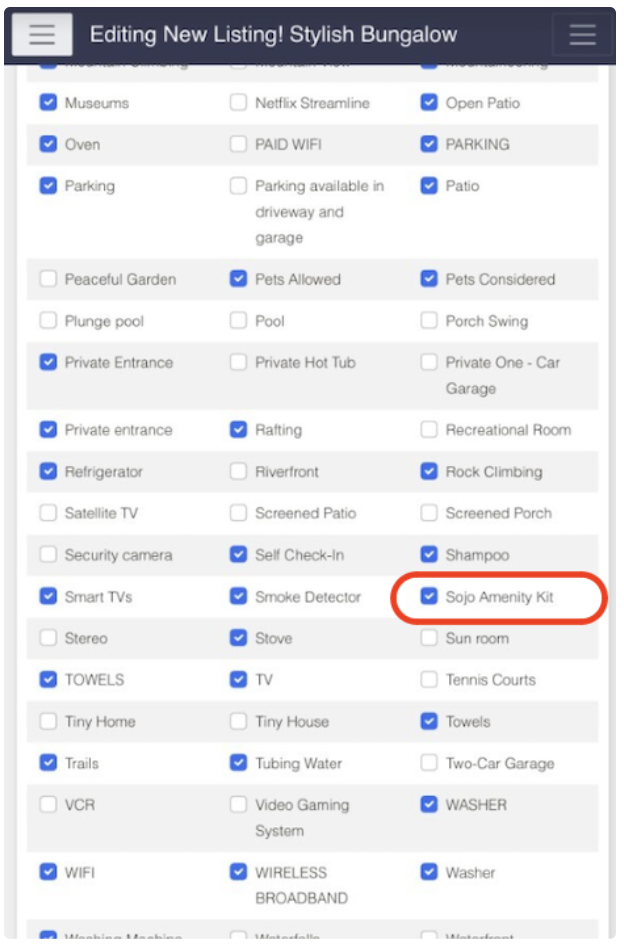
- Add the amenity 'Sojo Amenity Kit' EXACTLY like it is typed here to all properties (or areas) that you want sojo to provide kits
- Once iTrip has been enabled you can go into each listing and select the
Sojo Amenity Kitfrom the options for each property. Once you've checked the box for the desired properties; sojo is ready to complete the onboarding.
- Finally, gather your iTrip ID from iTrip, and send that to the onboarding specialist.